Reviewing the Adorable Baby Cat Silhouette Icon Bundle
As an embroidery designer who has spent countless hours digitizing and stitching thousands of designs, I have learned that simplicity is often the hardest thing to get right. When I first opened the Adorable Baby Cat Silhouette Icon Bundle, my initial reaction was one of cautious optimism. In a market flooded with overly complex, dense, and noisy graphics, a clean silhouette can be a breath of fresh air. However, clean lines demand precision. There is nowhere for poor digitizing to hide when you are working with minimal shapes. I wanted to see if this bundle held up under the needle, not just as a pretty picture on a screen, but as a functional asset for real-world machine embroidery design projects.
First Impressions and Visual Personality
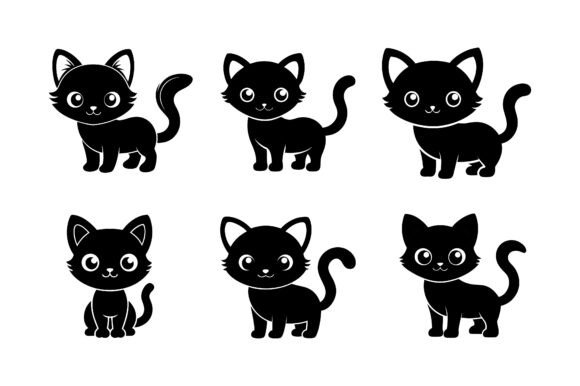
The mood of this collection is undeniably soft and approachable. The silhouettes capture the essence of kittenhood—rounded ears, compact bodies, and playful postures—without relying on intricate facial features or whiskers that often cause threading nightmares. For those of us who create handmade products, this visual personality is crucial. It speaks to a demographic that values charm and minimalism. Whether you are an Etsy seller looking to expand your nursery decor line or a hobbyist making gifts for friends, the aesthetic fits seamlessly into modern, scandi-inspired, or boho styles.
What stands out immediately is the versatility of the layout. Because these are icons rather than full-scene illustrations, they are modular. You can use a single cat as a pocket accent on a sweatshirt embroidery project, or cluster several together for a larger statement piece on a tote bag. This flexibility is rare in pre-made bundles, where designs are often locked into specific compositions. Here, the Graphics are provided in a way that encourages creative manipulation, allowing you to scale and rotate them to fit your specific hoop size constraints.
Real-World Application: The Tote Bag Test
To truly evaluate the Adorable Baby Cat Silhouette Icon Bundle, I decided to test it on a project that demands both durability and visual clarity: a canvas tote bag. Tote bags are a staple for any craft business, but they present unique challenges. The fabric is often coarse, and the item is subjected to heavy use and frequent washing. I chose a medium-weight cotton canvas and paired it with a cut-away stabilizer to ensure the stitches remained crisp over time.
I selected one of the sitting cat silhouettes from the bundle. Since the design relies on solid shapes, I opted for a fill stitch pattern rather than a satin stitch border, which helps prevent puckering on larger areas. The result was impressive. The silhouette retained its shape beautifully, with no visible gaps or thread breaks. The simplicity of the design meant that the stitch density could be kept moderate, preventing the fabric from becoming stiff or board-like. This is a critical consideration for any custom apparel or accessory; nobody wants a bag that feels like armor.
For those considering using these assets for Print Materials Mockups or digital previews, the clean edges translate exceptionally well to flat lay photography. The high contrast of the silhouette against various fabric textures creates an immediate visual hook, which is essential for online sales where customers cannot touch the product.
Navigating Fabric and Hoop Constraints
While the bundle performs admirably on stable fabrics like cotton and linen, I would advise caution when applying these designs to more challenging materials. For instance, if you are attempting baby embroidery on a delicate onesie, the stretch of the knit fabric requires careful handling. Even a simple silhouette can distort if the stabilizer is not robust enough. I recommend using a tear-away stabilizer backed with a light fusible interfacing to support the knit without adding bulk.
Similarly, when working with dark fabrics, thread color choice becomes paramount. A black silhouette on a navy shirt will vanish. I tested the design using a high-contrast cream thread on charcoal fleece, and the pop was exactly what I hoped for. However, if you are creating an embroidered patch for a cap, remember that curved surfaces can twist simple shapes. I found that keeping the icon size modest—around two inches wide—worked best for hats, ensuring the perspective didn’t warp the cute proportions of the cat.
Another area to watch is the level of detail in smaller hoop sizes. If you shrink these icons too much for a tiny monogram-style placement, the internal curves might become too tight for standard needles, leading to thread bunching. Always run a test stitch-out on scrap fabric before committing to your final finished product. This is especially true if you are new to working with digital embroidery file formats that may have been optimized for different machine brands.
Commercial Viability and Brand Consistency
For small shop owners and commercial embroidery professionals, consistency is key to building brand trust. The Adorable Baby Cat Silhouette Icon Bundle offers a cohesive look that can help unify a product line. Imagine offering a matching set: a cat silhouette on a mug wrap, a coordinating apron, and a tea towel. This kind of thematic consistency increases perceived value and encourages bundle purchases.
Moreover, the timeless nature of silhouettes means these designs do not feel tied to a fleeting trend. This longevity is vital for inventory planning. You can stitch these onto holiday embroidery items by adding seasonal elements like a pumpkin or snowflake, extending their usability year-round. The ability to adapt a core design asset across multiple seasons is a huge advantage for efficient production workflows.
Practical Designer Notes for Best Results
Before you dive into production, keep these technical tips in mind to maximize the quality of your work:
- Check Thread Contrast: Silhouettes rely entirely on shape. Ensure your thread color contrasts sharply with your fabric texture to maintain visibility.
- Test Stitch Density: If the default settings feel too dense for your fabric, adjust the pull compensation or density in your editing software to prevent puckering.
- Verify Licensing: Always confirm the license terms included with the bundle. Ensure you are compliant for both personal and commercial use, especially if selling on platforms like Etsy.
- Use Proper Stabilizer: Match your stabilizer to your fabric weight. Heavy canvases need cut-away support, while delicate knits benefit from tear-away with interfacing.
- Inspect Small Details: Zoom in on the digitized paths. Look for unnecessary jump stitches or tricky turns that might cause thread breaks during high-speed stitching.
In conclusion, the Adorable Baby Cat Silhouette Icon Bundle is a solid addition to any designer’s library. It bridges the gap between cute and professional, offering a versatile tool for everything from personalized gifts to boutique branding. By respecting the technical limitations of embroidery and choosing the right materials, you can turn these simple icons into high-value items that customers will love. It is a reminder that in design, less is often more, provided the execution is flawless.